
When worldwide crayon company Crayola set out in 1903 to create a palette of colors to inspire children’s artistic expression, they couldn’t have imagined the expansive variety of shades digitized art would demand. Although the company produced over 400 crayon colors since its inception—with names like melon, cornflower, and razzmatazz—the rainbow of tones wouldn’t compare to the millions of colors found in today’s digital images.
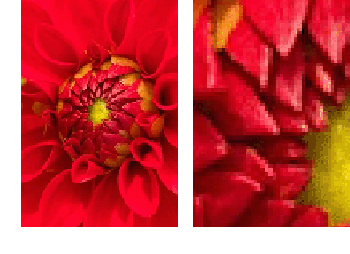 The process of digitization provides a peek into the world of color imagery and an object’s conversion from its non-digital, real-life format to its digital representation. Simply put, digital images are made up of something called pixels (a combination of picture and element), individual color blocks that form what we see as a picture or photo. As each pixel lies next to an adjacent pixel, a continuous image is revealed through the arrangement of these picture-elements in color and composition. Notice (at right) that only when zooming in close enough to a digital image will you be able to see the individual color squares that create the picture.
You may be wondering how computers can manage the data associated with the wide array of colored pixels that compose an image. Much like other forms of digital data that use the binary number representations of 0 and 1 (television and digital music, for instance), an image’s pixel is represented by how many and what combination of 0s and 1s, or bits, are used to specify each color of an image. For example, the color red is represented as 11111111 00000000 00000000 in its binary form. This is the computational magic happening behind the scenes of an image.
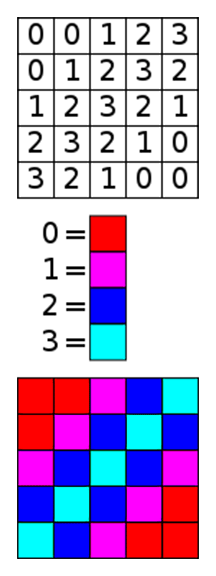 But for those of us less familiar with binary coding, there is another way to understand a pixel’s color pattern. The use of indexed color provides a clear solution. In digital color, every pixel is made up of the three primary colors: red, green and blue. Indexed color is a technique that stores a pixel’s color data (its color palette) in a color table, with each number, typically from 0 to 255, representing a specific shade of red, green and blue. At right, the chart of a 2-bit (four colors) indexed image illustrates the use of numbers to represent colors.
In indexed color, a black and white image denotes 0 for black and 1 for white. A more complex grayscale image denotes color values between 0 and 255, with black (the absence of color) represented as 0, and white (the presence of all colors) as 255. Every shade of gray in between is a combination of distinct number values that make up the image. In color imagery, pixel values use RGB—the three primary color channels of red, green and blue—in shade combinations that can reach into the millions.
Bit depth determines this availability of color for each pixel in an image. As seen in the images below, a 1-bit image (one bit per pixel, represented mathematically as 21) has two tones (most often, black and white, but also can be in color), while a 2-bit image (22) has four tones, and a 4-bit image (24) has 16 color values. A 24-bit image (224) combines RGB color channels (8-bit for each primary color) for each pixel, creating an image with more than 16 million color shades! Because there are many more combinations of 0s and 1s available to use in an image with a higher bit depth, more colors can ultimately be encoded in the image. And that’s good news for every artist—young and experienced alike—who wants accurate color representation for masterpieces of color envisioned.




1-Bit Image
2-Bit Image
4-Bit Image
24-Bit Image